
How to Improve Reading Concentration
(We offer 1-to-1 Help as Needed, Anywhere in the World)
Help for All Readers at Any Age
Learn About Our Software. Order Now.
Most people can easily read textbooks, novels and Internet articles quickly and well, with excellent speed, concentration, comprehension, recall and enjoyment, anywhere from average reading speed up to 500 words per minute and above. Read on to learn how.
The key to doing this is to use adjustable-speed computer-voice to accompany the text as you read the text just ahead of the sound, with special controls and special pagination.
Most people think that voice reading is just for blind people, or for audio books read at normal speaking speed, while you are driving or doing the dishes.
Actually, just the opposite is true. Adjustable-speed computer-voice is the best tool for increasing your ability to read fast and well and with high focus and concentration.
Students and adults can quickly read up to 350-500 words per minute with this approach, as they read their assigned reading. In addition to reading textbooks, this approach is ideal for reading assigned novels and anything on the Internet.
With a little practice, students learn how to transfer these new skills to reading any text without the aid of the voice.
The goal is to input and read text as fast as your mind can process it.
This means reading text as fast as you can handle it with adjustable pause at the end of each sentence for thinking; and the ability to instantly repeat each sentence or paragraph as often as necessary to master it.
Easily read any assigned reading on or offline on any iPad, iPod Touch, iPhone or Mac. This means at home, or at school or college, on the bus or train, or in a crowded room, or out walking or exercising at the gym, using earphones when appropriate.
The Proportional Reading Approach at helpmyreading.com teaches you how to do this with your iPhone, iPad, iPod Touch or Mac. You do not need any new software or hardware. What we do is teach you how to use what you already possess or have access to. This is like learning to drive. You already own or have access to a vehicle, you just need to learn how to use it.
Most people need about two hours of instruction to get started with this new lifetime skill.
What do you have to do to master this type of reading for the rest of your life?
1. You must be open-minded to learning something truly new and helpful. Take our Free Reading Course right here and request our live, interactive, Free Demo (anywhere in the world).
2. Now start practicing what you have just learned, and seen that you can do. You must have access to and command of the following tools and capabilities (which we teach you, or you can learn from our Manual):
Turn Voice Accompaniment on and off quickly and easily.
Adjust voice speed quickly up or down.
Read by sentence or paragraph or screen, as required by the complexity of the text.
Pause or continue reading as desired.
Repeat the current sentence or paragraph instantly, as often as desired.
Easily look up words and make list of definitions.
Easily enlarge font size if necessary.
Quickly adjust contrast and brightness.
Quickly adjust volume of voice.
Quickly match text in book to text on screen.
Read text continuously if desired, especially on second time through.
Advance text automatically from page to page as it is highlighted for reading.
In addition: Voice and text presentation must stop instantly when you loose focus and concentration.
Easily format Internet articles without junk adds (in Reader) on iOS devices.
Easily format and save Internet articles in HTML for offline reading in Mac or PC (without online problems).
Easily add sentence breaks to complex text on Mac or PC (for iOS devises or Mac or PC).
Easily format texts for iOS devices in large enough font size for easy reading.
Easily access Textbooks by chapter on Internet (as downloadable articles in HTML), with text presented by sentence within indented paragraphs, ready to read.
Easily access Textbooks by chapter offline (as attachments or Dropbox articles in HTML), with text presented by sentence within indented paragraphs, ready to read.
Easily and quickly transfer documents from Pages or Word to HTML for reading by sentence or paragraph or screen.
All these subjects are fully discussed in our User Manual and our free, online Reading Course.
We teach you how to master a new type of reading. We offer training in how to use the software that you already have on your iPad, iPhone, iPod Touch, Mac laptop, or Mac desktop computer, or on your PC (including software that you can download for free). The first part of the training teaches setup and operation of the controls for this new type of reading. The second part of the training teaches you how to improve your reading using these controls and this new approach. You will learn how to use this approach to read almost any article on the Internet or any textbook or novel at the speed you think, up to and above 500 words per minute. Besides completing assigned reading, you will overcome the 18 Bad Reading Habits and develop transferrable skills for reading regular books.
What you will experience in our approach to reading is a new way to experience a lecture, combined with a new way to read. Imagine going to a lecture where you get to choose the speed at which the professor speaks. Secondly, as the professor speaks you also read each sentence, and just ahead of the sound, pausing at the commas and periods for the sound to catch up. Thus, the sound acts to immediately correct any reading errors, and completely removes any reading anxiety. At the end of each sentence, the sound pauses automatically for as long as you wish, for you to think about what you have just read for as long as you want. Then when you are ready, you press a single key to proceed. You can also repeat any sentence as many times as you want before proceeding. You are in complete control. You proceed with full comprehension and focus at the speed your mind processes thought. With a little practice, you will quickly increase your speed.
Learn About Our Software. Order Now.
NOW DO OUR FREE, LIVE, INTERACTIVE DEMO
Go To Our Free Training Manual on how to set up your iPhone, iPad, iPod Touch, Mac (laptop or desktop), or PC to read text with adjustable-speed, computer-voice and text. This manual is ideal for self-instruction. Learn More.
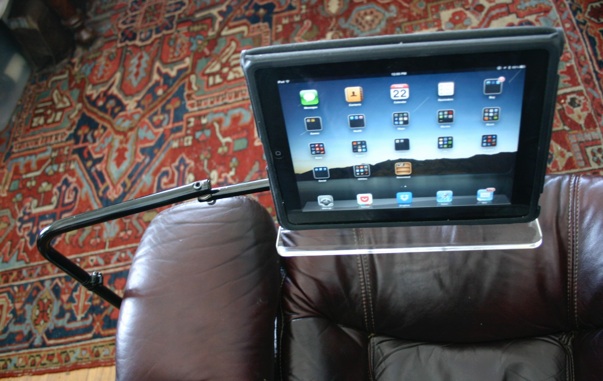
Check Out Our iPad/Book Floor Stand
Please read the following articles to learn more:
Experience The Joy of Reading Well
Seven Misconceptions about Reading Improvement
Turn Reading into a Video Game to Increase Comprehension, Speed, and Compliance
The Nine Major Benefits of Using Proportional Reading
Variable-Speed Computer-Voice and Text Reading
The History of Proportional Reading
Short Overview of Our Two Hour, 1-on-1 Course
Detailed Description of Our Two Hour, 1-on-1 Course
Ten Perspectives on Proportional Reading
Adjustable-Speed computer voice follows just behind your reading of visual text.
This is not plain text to speech, or audio books, but much more.
On-Site
Sessions
Around
Boston and
North Shore